|
2024-01-29 16:12 developer |
iid.png (23,853 bytes) |
|
|
Hi Jason I received the following from SKB ================================================================ Netflix UI542 HomeUI has been released at UI542 branch The server settings are as follows ( * 0 3 2 3 # ) at UI542 1. VCS Web address : STG , 542 , "저장" 2. WEB APP ID : 542 "저장" 3. CSS IP : 1.255.102.59 - Server 1.255.102.59 is a development server, so please connect only 1 STB for IID verification and proceed with the test. - SKB are working on 1.255.102.150 for additional STBs. I will let you know when it is completed. ================================================================ But when I tested it now, HomeUI is not showing up. and SKB manager is checking it right now I'll let you know when I can access it Thank you YK.Jung image.png (165,937 bytes) |
|
|
Hi Jason I've checked that UI542 is working ================================================================ Netflix UI542 HomeUI has been released at UI542 branch The server settings are as follows ( * 0 3 2 3 # ) at UI542 1. VCS Web address : STG , 542 , "저장" 2. WEB APP ID : 542 "저장" 3. H/E : STG (*) 4. NUGU : STG (*) 5. CSS IP : 1.255.102.59 - Server 1.255.102.59 is a development server, so please connect only 1 STB for IID verification and proceed with the test. Now , only one STB can be tested at Server 1.255.102.59 <=== (Note) The server is unable to connect more than 5 STBs. so only one was assigned to each manufacturer - SKB are working on 1.255.102.150 for additional STBs. I will let you know when it is completed. 6. rebooting (*) ================================================================ Please check it Thank you YK.Jung image-2.png (164,333 bytes) |
|
|
Hi Jason Please update the review results on the failed items(6 Netflix icon) when using UI542(netflix ui). Thank you YK.Jung |
|
|
Hi YK, When I use buring tool to burn 15.542.4 image. After logined SKB account, there is no UI I can NOT use hotkey to (* 0 3 2 3 #) to bring up the server configuration page . => Could you check it? then I reboot device, the UI shows correctly => is it expected ? And I can go to channel page and use hot key to bring up the server configuration page. Thanks Jason |
|
|
Hi Jason CSSIP changed and where cssip has been changed to 1.255.102.58 there is no problem if multiple STBs are connected at the same time ===================================================== The server settings are as follows ( * 0 3 2 3 # ) at UI542 1. VCS Web address : STG , 542 , "저장" 2. WEB APP ID : 542 "저장" 3. H/E : STG (*) 4. NUGU : STG (*) 5. CSS IP : 1.255.102.58 6. rebooting (*) =============================================== And here are three ways to run the netflix app 1) press OK at Netflix icon of DockMenu ( top menu ) 2) press OK at OTT icon of DockMenu ( top menu ) 2-1) press OK at today OTT 3) press OK at OTT icon of DockMenu ( top menu ) 3-1) press down and press ok at netflix icon Please update the review results on the failed items(6 Netflix icon) when using UI542(netflix ui). Thank you YK.Jung |
|
|
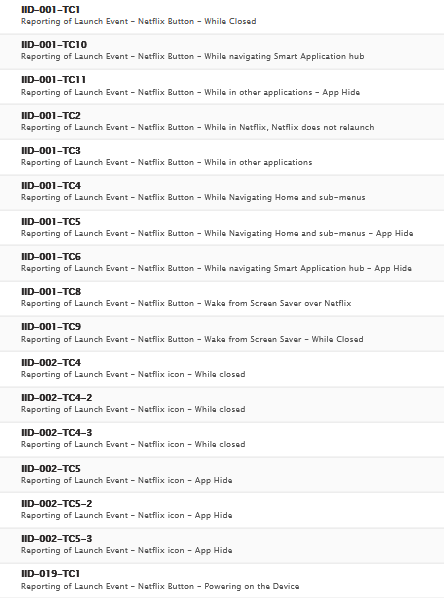
Hi YK, Please refer to iid-icon_realated .png It was tested with 15.542.4 Thanks, Jason iid-icon_related.png (121,856 bytes) |
|
|
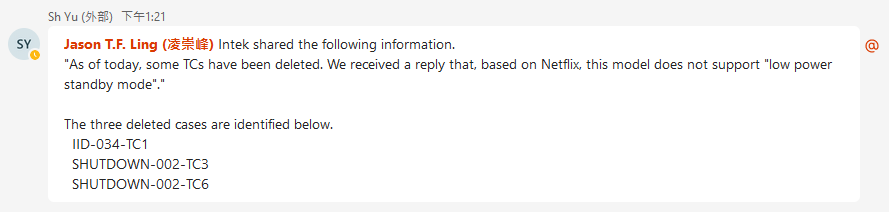
Hi YK, Today, AML KR forward one iid failure to us (IID-034-TC1) But we don't have this items, After AML KR checked it Intek has 18 iid related item. but Foxconn has 17 iid item. => Intek has one more test item (IID-034-TC1) The cause is that Intek declare "Supports Low Power Standby" as "YES" in NRD Feature. But we set it as "NO", because as far as I know, the low power standby (passive standby) is not official feature, there is no official UI to setup it. Could you check it with SKB that we should set it as YES? (because currently the passive standby is in hidden menu). if we set the feature as YES. I think we should have official UI to setup it. and if we set it as YES, there will be one more IID-034-TC1 test item. Thanks, Jason |
|
|
HI Jason I checked with SKB Netflix manager. >> Could you check it with SKB that we should set it as YES? (because currently the passive standby is in hidden menu). >> if we set the feature as YES. I think we should have official UI to setup it. Please set the feature(Supports Low Power Standby) to Yes. Even if it's a hidden menu, we have to support it (https://btracker-cns.fii-foxconn.com/vaas/view.php?id=1879) Thank you YK.Jung |
|
|
Hi YK, Could you check the following issue with UI vendor. We tested iid icon related with 15.542.8 this morning. During testing. the NTS will terminated Netflix app, then the HomeUI Must be displayed But when Netflix is terminated, we see the 1 frame of HomeUI, then got the black screen, at this this time, Even if we keep pressing home, the screen is always black 15.542.4 doesn't have this problem. I think this is UI issue. Did Intek report the same issue? Thanks, Jason |
|
|
Hi Jason >> But when Netflix is terminated, we see the 1 frame of HomeUI, then got the black screen, The same issue is being observed when tested with INTEK STB. ( attached video ) >> at this this time, Even if we keep pressing home, the screen is always black If you press home while the home menu is displayed, there is no update. After pressing the exit"나가기" button, press the Home button to restore it. Anyway, it's an issue, so I'll report it to SKB. Thank you YK.Jung KakaoTalk_20240216_092052330.mp4 (7,102,596 bytes) |
|
|
Hi YK, >>Please set the feature(Supports Low Power Standby) to Yes. >>Even if it's a hidden menu, we have to support it For low power mode feature on PDM NRD feature. AML KR forward the following comment this noon, so we will set it as false, too. Thanks, Jason low_power.png (13,988 bytes) |
|
|
Hi YK, We've finished NTS certification, so I close it. Thanks, Jason |
- yk.jung ( (ALTech) Younkwang Jung ) developer
.png)
.png)